Popular Tags
Top 10 Smart Doorbell Risks
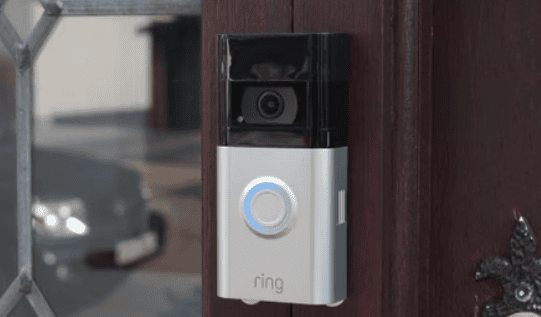
Smart doorbells are one of the most popular additions to modern home security systems. They give you eyes on your front door, let you talk to visitors remotely, and add convenience to your daily life. But like any connected device, they also come with a long list of potential vulnerabilities—some of them serious.
In this week’s Tech Tip Tuesday, we’re cutting through the hype to bring you the 10 most critical risks you need to know about, and how to combat them. Whether you’re using Ring, Nest, Arlo, Eufy, or another brand, these are the issues that could compromise your privacy, your safety, or both.
1. Your Footage Could Be Shared Without Your Permission
Ring has shared video with police—without warrants or owner approval—via its “Neighbors” program. That means your footage could end up in the hands of law enforcement, even if you never agreed to it or were never notified.
This raises major questions about who really controls your video data—and what rights you’re giving up when you use certain features.
What to do:
Go into your app settings and turn off automatic sharing. Opt out of neighborhood watch integrations if they exist. Before you buy, read the company’s privacy policy and see if they allow footage to be handed over without a subpoena.
2. Hackers Can Gain Access to Your Camera and Network
Smart doorbells are part of your home Wi-Fi network, which means a security gap in the device can become a gateway into your entire system. In past incidents, attackers have hijacked doorbell cameras to watch homes, harass residents, or breach connected accounts.
What to do:
Set a unique, complex password for your doorbell account and enable two-factor authentication (2FA). Keep firmware updated. Never reuse passwords from other logins, and don’t link your doorbell to unsecured smart home devices.
3. Employees at Some Companies Have Access to Your Videos
Some smart doorbell manufacturers have come under fire for allowing employees internal access to user footage—without proper oversight or transparency. Even if it’s rare, the idea that someone inside the company could be watching without your knowledge is reason enough to pay attention.
What to do:
Choose companies with strong transparency practices. Look for brands that publish privacy reports, disclose access logs, and enforce strict employee data policies. If a company won’t explain how they protect your footage internally, move on.
4. Motion Alerts Aren’t Always Reliable
Too many false positives—like car headlights or blowing leaves—and you’ll start ignoring alerts. But if sensitivity is too low, you could miss a real threat. Many users assume these alerts are precise and intelligent out of the box—they’re not.
What to do:
Set motion detection zones and tweak sensitivity levels based on your layout. Test by walking through the detection area at different times of day. Your smart doorbell needs to match your environment—not some factory default.
5. Cloud Storage Makes Your Footage Vulnerable
Most smart doorbells upload footage to cloud servers. If those servers get hacked—or if a government agency issues a request—your recordings could be exposed. Even with encryption, your video is only as safe as the company’s security policies.
What to do:
If privacy is a priority, choose a doorbell that supports local storage (such as some models from Eufy, Reolink, or Lorex). If cloud storage is unavoidable, ensure your account has a strong password, 2FA, and limited access sharing.
6. Weak Wi-Fi Can Make Your Doorbell Useless
If your signal is spotty where the doorbell is mounted, it won’t stream live video, capture footage, or send alerts reliably. Many people install smart doorbells only to realize too late that the Wi-Fi coverage at the front door is poor.
What to do:
Test your Wi-Fi signal outside before installation. If it’s weak, install a Wi-Fi extender or mesh system. Don’t rely on the same setup that works fine inside—outdoor reliability matters more.
7. Bad Installation Leads to Long-Term Problems
Many performance issues—glitches, freezing, choppy audio, or power loss—stem from incorrect installation. Improper wiring, incompatible transformers, or cheap mounting solutions are often the root cause.
What to do:
If you’re wiring it yourself, make sure your doorbell transformer delivers the correct voltage. Follow the brand’s specific instructions, and don’t skip grounding or testing. For wired setups especially, professional installation is often worth the investment.
8. Software Updates Can Break Your Device
Updates don’t always go smoothly. There have been cases where firmware updates caused doorbells to stop recording, disconnect from Wi-Fi, or lose key features. And unlike your phone, some smart doorbells don’t let you roll back an update.
What to do:
Hold off on installing new firmware right away—wait to see if others report issues. Follow support forums or user groups to spot early problems before you experience them yourself.
9. Blind Spots Can Leave You Vulnerable
Doorbell cameras often miss packages placed directly below or people standing off to the side. Most users assume “it’s got a camera” means “it sees everything.” That’s not the case.
What to do:
Install using a wedge mount to optimize the field of view. Walk through different approach angles to see what the camera actually captures. Add a secondary camera if necessary for full coverage of entry points.
10. Facial Recognition Can Cross Legal Lines
Some smart doorbells offer facial recognition features that can identify frequent visitors. But capturing and cataloging someone’s face—especially without consent—can violate privacy laws in certain states or countries.
What to do:
Disable facial recognition unless you’re absolutely sure it’s legal and necessary in your area. Even if it’s enabled by default, it doesn’t mean you should use it. The more personal data your device collects, the more liability you take on.
Bottom Line:
Smart doorbells are useful tools—but they’re not foolproof. Like any tech connected to your home and network, they require proper setup, secure configurations, and a clear understanding of how your data is being used.